Dev Handover & README Kit
Read the code and get a README, handover doc and question list
Dev Handover & README Kit is a vibe coding kit for Claude Code and Codex. Read the code and get a README, handover doc and question list. It includes 8 fixes for pitfalls the maker hit in real work. Free.
When this helps
You want to hand over a system, but the README is stale and no one knows where the keys are kept
What it does
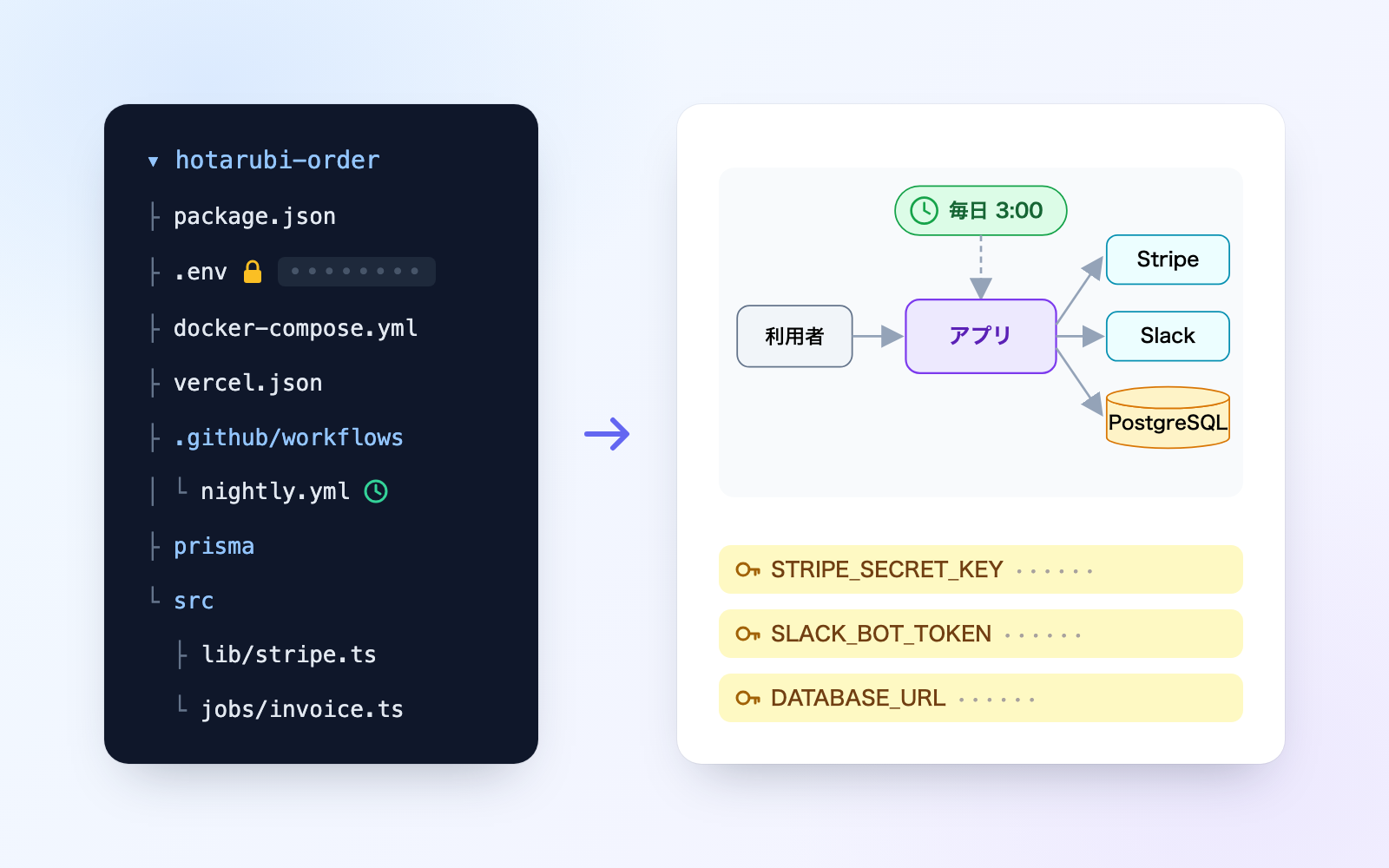
Just by reading the code folder, it produces a README, a handover doc and a question list for the previous developer. The handover doc includes a diagram, the next run time of scheduled jobs (converted to Japan time), external services, where keys are kept and cautions. Key and password values are never copied anywhere, and the kit writes nothing into the code folder. Paste a reply from the previous developer and it files into the handover doc by question number; places where keys are written and instruction-like text are kept separate in an internal-only check that is never shared. You can also try it on a sample codebase for a fictional printing company.
The fixes baked into this kit
- Assuming scheduled jobs always run on UTCThe old assumption that "GitHub Actions only runs on UTC" is outdated now that a timezone can be specified. The kit reads whatever timezone is written and converts it to Japan time, and reports "unknown" (asking the previous developer) when the timezone depends on the machine running it.
- AI summaries getting a schedule's default timezone wrongA web-summarizing tool sometimes answered a spec's default timezone incorrectly. The kit checks the exact wording of the original document rather than a summary, and treats it exactly as the original states.
- Misreading "1st of the month and every Monday" as both conditionsReading a cron expression that sets both day-of-month and day-of-week as "the day matching both" gets the run days wrong. Following the crontab spec, the kit counts the next run time as "the day matching either" and flags it for review.
- Mistaking translation-file words for hardcoded keysCounting entries like "password: Passwort" in translation files as hardcoded keys produced over 80 false hits in one codebase. The kit no longer counts translation-file wording, plain-word values or string interpolation as key values.
- Mistaking English code comments for instructions to the AIHTML comments and code comments describing logic ("skip", "bypass") were sometimes mistaken for instructions aimed at the AI. The kit strips comment markers and reads the content itself, and does not flag descriptive text that has no wording addressed to an AI.
- Treating local container connections as seriously as production keysLocal container connection strings, such as those in docker-compose, were being weighted the same as production keys. Connections pointing to localhost or a container name are now sorted into the "verify if real" category instead.
- A question list ballooning to 34 questions, one per keyMaking one question per key swelled the question list to 34 questions, too many to get answered. The kit now groups questions by service and by database, and puts 13 "always ask" questions (admin-panel ownership, billing, backups, etc.) first.
- Instructions embedded in code leaking into the handed-over READMEInstruction-like text embedded in code, and UI labels for driving on-screen flows, could end up copied straight into the README being handed over. Deliverables are now built only from fields that are allowed in, then re-checked for key values, instruction-like text or internal-only notes before being released; if any are found, it stays a draft.
What's inside
- The flow (read → note → question list → answers → hand over)
- A tool that reads the code and builds a README and handover doc
- A system that pulls together the diagram, scheduled jobs, external services and where keys are kept
- A tool that converts scheduled-job times into Japan time (correcting the 9-hour UTC gap)
- A question list for the previous developer, plus a tool that files replies by question number
- An internal-only check that finds where keys are written and instruction-like text
- A sample codebase for a fictional printing company to try it on
- A list of pitfalls drawn from official docs and statutes
File list (40)
- .gitignore
- AGENTS.md
- CLAUDE.md
- KIT.md
- NOTES.md
- data/README.md
- output/README.md
- rules/CHECK.md
- rules/FLOW.md
- rules/LAW.md
- rules/PROMPTS.md
- rules/SPEC.md
- rules/TONE.md
- samples/hotarubi/fix.json
- samples/hotarubi/memo.json
- tools/answer.mjs
- tools/cron.mjs
- tools/days.mjs
- tools/legal.mjs
- tools/lib/answers.mjs
- tools/lib/build.mjs
- tools/lib/cron.mjs
- tools/lib/dates.mjs
- tools/lib/day.mjs
- tools/lib/flow.mjs
- tools/lib/guard.mjs
- tools/lib/injection.mjs
- tools/lib/law.mjs
- tools/lib/ledger.mjs
- tools/lib/page.mjs
- tools/lib/paths.mjs
- tools/lib/project.mjs
- tools/lib/reader.mjs
- tools/lib/result.mjs
- tools/lib/run.mjs
- tools/lib/sample.mjs
- tools/lib/services.mjs
- tools/list.mjs
- tools/make.mjs
- tools/note.mjs
The first three decisions
- The code folder to hand over (dropped into this screen)
- A nickname (default: the folder's name)
- Your role (receiving or handing over; default: receiving)
What you need
- No extra costClaude Code or CodexBoth CLAUDE.md and AGENTS.md are included
- No extra costNode.js 18 or newerUsed to run the tools. Nothing else needs installing
- No extra costThe code folder you're handing overSomething on your computer. Fetching it from the repository host is up to you or the previous developer
- No extra costA browserUsed to view the results page and handover doc
How to use
Just paste this into your AI.
I want to use the nice to have kit "Dev Handover & README Kit". Follow https://nicetohave.app/en/g/4WVL2QYR-•••••••••• and set it up.
Works the same in Claude Code or Codex.
Read what this tells your AI to do, before you paste it
If you would rather take the files yourself
Paste the line above and your AI fetches it. If your AI cannot fetch it, or you would rather download it yourself, start here.
- Unpack the zip you downloaded
- Open the resulting folder in Claude Code or Codex (in VS Code, "Open Folder")
- Type "start building with this kit". The instructions are inside (Claude Code reads
CLAUDE.md, Codex readsAGENTS.md)
FAQ
- Can I try it before handing over real code?
- Yes. Say "try it with a sample" and the kit builds a fictional printing company's order codebase and runs it through, so you can confirm values aren't copied and instruction-like text isn't followed.
- Can you tell me plainly whether logging in with a former contractor's password is legal?
- It won't give a definitive legal answer. The one thing to check is whether the account owner gave permission to use it; when in doubt, it tells you to confirm with your contract manager or a lawyer.
- If no keys are found at all, does that mean there really are none?
- No. The check only catches values that match a recognizable pattern, so finding none is reported as-is rather than claimed to mean there are no keys.
- Does it read anything outside the code folder, like a parent folder or another project?
- No. It only reads inside the folder you provide; it doesn't follow links pointing elsewhere and just reports how many there are.
- If I erase a project's documents, does the code folder get deleted too?
- No. Erasing only removes the documents the kit created and that project's notes; it never touches the code folder you handed over.
Reviews
This is your kit. You can also see its reviews on your page.
No reviews yet. Be the first to say something.
Supporters
Once support opens, the people who backed this kit will be listed here.
- Publisher
 shuto-shinoda
- Published
- 2026/10/28
- Price
- Free
- Category
- Documents
- Personal data
- Handled
- Security review
- Needed (depends what you handle)
- What's inside
More kits
shuto-shinoda2026/10/28
 In-House AI Usage Rules KitFree
Answer about your AI services and contracts, get staff rules and a ledger
shuto-shinoda2026/10/28
In-House AI Usage Rules KitFree
Answer about your AI services and contracts, get staff rules and a ledger
shuto-shinoda2026/10/28
 Power of Attorney KitFree
Just talk, and get a power of attorney checked for blanks and overreach
shuto-shinoda2026/10/28
Power of Attorney KitFree
Just talk, and get a power of attorney checked for blanks and overreach
shuto-shinoda2026/10/28