BGM & Sound Effects Kit
Turn one sentence into three BGM, jingle or SFX candidates to compare
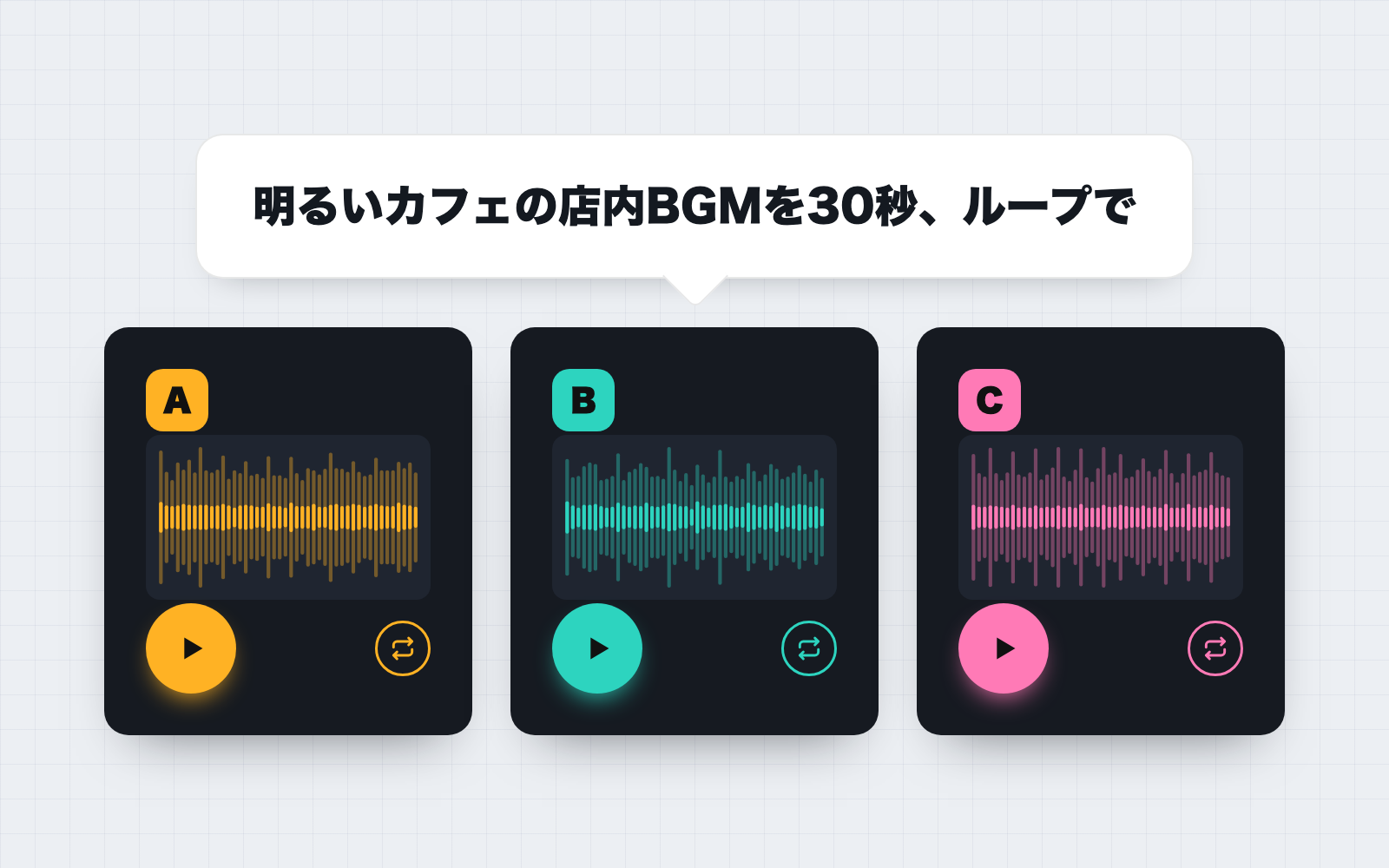
BGM & Sound Effects Kit is a vibe coding kit for Claude Code and Codex. Turn one sentence into three BGM, jingle or SFX candidates to compare. It includes 8 fixes for pitfalls the maker hit in real work. Free.
When this helps
You need shop or video sound fast, but free sound libraries make rights and defects like clipping hard to check
What it does
Rewrites a one-sentence request (e.g. "a bright café BGM, 30 seconds, looping") into a sound design, then synthesizes three BGM, jingle, or sound-effect candidates as WAV. It uses no recordings, generative-AI services, or external APIs, and generates each melody from a random seed, so results never resemble an existing song. Exported audio is re-measured for loudness, clipping, loop-seam clicks, and start/end silence, then shown on a comparison page for you to listen and pick. It never recommends a favorite, only differences and measured numbers. Phrases like "brighter" or "10 seconds longer" produce a new version, and the chosen take is placed in the export folder with an ASCII filename and a rights ledger.
The fixes baked into this kit
- A looping BGM clicks every time it repeatsYou won't notice it on a single listen, but there's a discontinuity where the end meets the start. The fix crossfades the tail into the head before cutting, then re-reads the exported WAV to measure the seam gap. You can check it with the "listen to the seam" button on the comparison page.
- A 30-second loop at tempo 100 has its beat land mid-measure at the seam30 seconds at tempo 100 works out to 12.5 bars, so the loop point falls mid-bar. The fix nudges the tempo slightly so the length lands on a whole bar, and shows how much the tempo was adjusted.
- BGM and sound effects came out nearly twice as loud as each otherMatching by waveform amplitude caused this, and pushing it further could clip between samples. The fix matches loudness the same way broadcast does (ITU-R BS.1770-5) and oversamples the true peak 4x to keep it under the ceiling.
- Sharp, short sounds hit the peak ceiling before reaching the target loudnessThis happened on 2 of 14 tested UI sounds. The fix stops raising the level right at the ceiling and reports how far short of the target it landed.
- Sound effects under a second can't be measured accurately by averaging the whole clipThe fix measures the loudest 400ms window, sliding it in 10ms steps, and uses that same rule consistently when generating, measuring, and matching loudness.
- A WAV exported by other software contained an unrecognized chunk (FLLR) and couldn't be readThis also came up with 24-bit and float WAV files. The fix reads chunks in sequence and skips unrecognized ones, and tells you in plain language to export MP3s to WAV first.
- Asking for something "like [a song title]" risked imitating itCopying a melody risks resembling a copyrighted work. The fix generates every melody from a random seed and has no input path for melodies at all — if it spots something that looks like a title, it says so and uses a mood word instead.
- Japanese export filenames got mangled on servers and in editing softwareThe fix exports files using only ASCII letters, numbers, and hyphens, encoding the length and whether it loops into the name itself.
What's inside
- A mechanism that rewrites your one-sentence request into a sound design (mood, tempo, chords, timbre, length, loop)
- A tool that synthesizes BGM, jingles, and sound effects from scratch (no recordings or external APIs)
- A tool that re-measures loudness, clipping, loop-seam clicks, and start/end silence
- A comparison page (waveform, playback, and a "use this one" button)
- A way to create new versions by saying things like "brighter" or "10 seconds longer"
- An ASCII export filename plus a rights ledger that records how each file was made
- Tools to measure your own WAV files and to match loudness across multiple sounds
- Loudness targets and source references for each destination (broadcast, streaming, etc.)
File list (40)
- .gitignore
- AGENTS.md
- CLAUDE.md
- KIT.md
- NOTES.md
- data/README.md
- output/README.md
- rules/CHECK.md
- rules/FLOW.md
- rules/LAW.md
- rules/PROMPTS.md
- rules/SPEC.md
- rules/TONE.md
- samples/nemurigame/01-fix.json
- samples/nemurigame/01.json
- samples/nemurigame/01.txt
- samples/nemurigame/02.json
- samples/nemurigame/03.json
- samples/nemurigame/04.json
- samples/nemurigame/05.json
- samples/nemurigame/05.txt
- samples/nemurigame/company.json
- tools/align.mjs
- tools/clean.mjs
- tools/lib/build.mjs
- tools/lib/chrome.mjs
- tools/lib/compose.mjs
- tools/lib/design.mjs
- tools/lib/guard.mjs
- tools/lib/injection.mjs
- tools/lib/judge.mjs
- tools/lib/law.mjs
- tools/lib/listen.mjs
- tools/lib/measure.mjs
- tools/lib/paths.mjs
- tools/lib/render.mjs
- tools/lib/result.mjs
- tools/lib/rng.mjs
- tools/lib/show.mjs
- tools/lib/store.mjs
The first three decisions
- The kind of sound and mood you want (e.g. a bright café BGM)
- Length (seconds, e.g. "30 seconds" or "a minute and a half")
- Where it will be used (streaming, broadcast, shop, video, game — OK to leave undecided)
What you need
- No extra costClaude Code or CodexBoth CLAUDE.md and AGENTS.md are included.
- No extra costNode.js 18 or newerOnly needed to run the tools — nothing else to install.
- No extra costA browserTo listen on the comparison page (Chrome, Edge, or Safari).
How to use
Just paste this into your AI.
I want to use the nice to have kit "BGM & Sound Effects Kit". Follow https://nicetohave.app/en/g/8VJ8UHPN-•••••••••• and set it up.
Works the same in Claude Code or Codex.
Read what this tells your AI to do, before you paste it
If you would rather take the files yourself
Paste the line above and your AI fetches it. If your AI cannot fetch it, or you would rather download it yourself, start here.
- Unpack the zip you downloaded
- Open the resulting folder in Claude Code or Codex (in VS Code, "Open Folder")
- Type "start building with this kit". The instructions are inside (Claude Code reads
CLAUDE.md, Codex readsAGENTS.md)
FAQ
- Can it make songs with vocals or singing?
- No — it can't synthesize a human voice, so it plays the melody on the lead instrument instead. If you need vocals, record a singer separately.
- Can I get MP3 instead of WAV?
- It only exports 16-bit WAV. Convert to MP3 or other formats using your destination or your video editor.
- Is it legally fine to play this in my shop?
- The kit won't give a flat answer. The audio is synthesized from scratch by the kit's tools, not a track registered with a rights organization, but if you also play other music, that music needs its own clearance. It shows you the relevant source wording so your company or a specialist can decide.
- Can it make something in the style of a famous song?
- It can't imitate a melody. Even if you name a song or artist, it generates its own melody from a random seed and applies mood words instead, letting you know it did so.
- Can I measure a WAV file I already have?
- Yes, as long as it's a WAV. Export MP3, M4A, or FLAC files to WAV first. Measuring never modifies the original file, and matching loudness creates a copy instead.
Reviews
This is your kit. You can also see its reviews on your page.
No reviews yet. Be the first to say something.
Supporters
Once support opens, the people who backed this kit will be listed here.
- Publisher
 shuto-shinoda
- Published
- 2026/11/16
- Price
- Free
- Category
- Video & stickers
- Personal data
- Not handled
- Security review
- Not needed (no personal data)
- What's inside
More kits
 teluki08152026/10/13
 Vertical Reel Factory KitFree
Turn raw footage into vertical product shorts, built from a target-and-selling-point foundation as deliberate combinations, then refined by the numbers
 ohirutabeyo2026/10/04
 Pixel Motion KitFree
Hand it one drawing, get 16 animated frames
ohirutabeyo2026/09/11