Vertical Reel Factory Kit
Turn raw footage into many vertical product shorts, each from a different angle
Vertical Reel Factory Kit is a kit for Claude Code and Codex. Turn raw footage into many vertical product shorts, each from a different angle. It includes 11 fixes for pitfalls the maker hit in real work. Free.
When this helps
You have plenty of footage but can't keep up with editing, and AI edits come out with outfits jumping around and unnatural captions
What it does
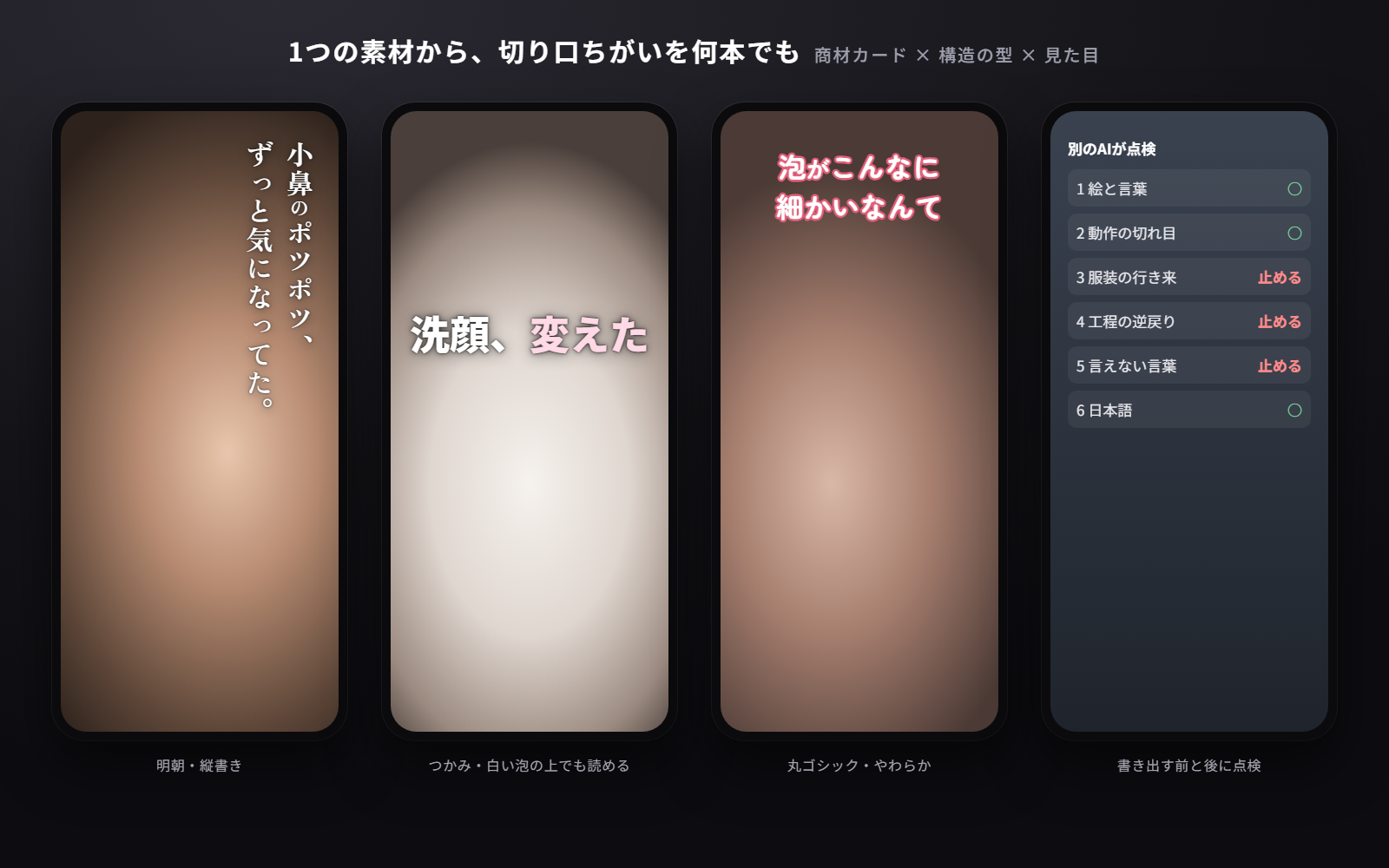
Hand over your raw footage and the product materials. The kit puts what you are allowed to say about the product onto a single product card, derives angles from who it is for, which pain point, and which selling point, then renders one vertical short (9:16) per angle. Timing comes from five structure templates and caption styling (typeface, size, position, colour, entrance) from a catalogue of ten looks, so every video stays consistent. Before rendering, it machine-checks for outfits jumping back and forth, steps going backwards, near-identical shots in a row, and claims that cosmetics and advertising law forbid. After rendering, it lines up each cut's frames and words and has two separate AIs review them. Narration and background music can be added, and loudness is levelled to the social-media standard. Captions are written in Japanese. Shooting and posting are not included.
The fixes baked into this kit
- Shirtless after a bath → dressed → shirtless againFootage of the same person with different outfits or wet hair was mixed. The footage index now separates looks, and any A→B→A order is stopped before rendering
- A foam-covered face appears again after rinsingEach step is numbered, and any order where the number goes back is stopped (only the opening teaser is exempt)
- "No need to scrub" over a shot of him rubbing his eyesWords and picture said the opposite. Claim shots must now use a segment where the picture proves the claim, and the index records whether hands are on the face
- "It turns into foam by itself" over a face that is already whiteOnly the after-state was used. Segments are now cut to include the change itself
- White text sinks into white foam and beige wallsThe brightness under the text is measured and the shadow is strengthened in three steps. Oval scrims look like grey clouds, so they are not used
- Vertical text lands on the label of a black bottle"Place on the darker side" picked the dark product. Scenes with the product can now fix which side the text goes
- Cuts land mid-head-turn or mid-gestureMotion is measured and cut in/out points move to pauses (up to 1.2 s shift and ±0.4 s length)
- The writing AI misses its own mistakes; reviewers disagreeA separate AI reviews. The same video scored 4 and 9 problems with different reviewers, so two are asked and anything both flag is always fixed
- The particle-shrinking marker ~ shows up on screenUnpaired markers are stopped before rendering
- The AI invents lines like "Verdict: it's a yes" or "cheapest"AI-sounding phrases and comparisons that need evidence are flagged in the checks
- Vertical text overlaps the social app's buttonsVertical text is kept within 6.5% from the top and 880 px tall; horizontal text within 820 px wide
What's inside
- Step-by-step flow and a quick-reference sheet of values
- Product card template (what you may say) and a fictional face-wash example
- Five short-video structures (problem→solution, surprise first, sceptical review, routine, how-to)
- A catalogue of ten caption looks and six families to keep one video consistent
- A tool that tiles your footage so the AI can index which second shows what
- Pre-render checks (outfit jumps, steps going backwards, similar shots, forbidden claims, AI-sounding phrases)
- Rendering that snaps cuts to pauses in motion, protects white text on bright backgrounds, and mixes voice and music
- A post-render review flow with two separate AIs, and the sheets it needs
- A running log of what people found unnatural
- A self-test that runs end to end on synthetic footage
File list (50)
- .env.example
- .gitignore
- AGENTS.md
- CLAUDE.md
- KIT.md
- assets/fonts/LICENSE-OFL.txt
- assets/fonts/README.md
- assets/music/README.md
- package.json
- products/_template/card.json
- products/example-awa-wash/angles.md
- products/example-awa-wash/card.json
- rules/CHECK.md
- rules/FLOW.md
- rules/PROMPTS.md
- rules/TONE.md
- rules/footage-tagging.md
- rules/naturalness.md
- rules/product-card.md
- rules/reference-notes.md
- rules/review.md
- rules/structure.md
- rules/telop-design.md
- rules/telop-writing.md
- rules/voice-music.md
- src/build.mjs
- src/catalog.mjs
- src/check.mjs
- src/lib/chrome.mjs
- src/lib/fonts.mjs
- src/lib/frame.mjs
- src/lib/inspect.mjs
- src/lib/lint.mjs
- src/lib/project.mjs
- src/lib/sh.mjs
- src/lib/tts.mjs
- src/lint-cli.mjs
- src/review.mjs
- src/scan.mjs
- src/selftest.mjs
- src/shot.mjs
- src/styles/index.mjs
- src/styles/looks.mjs
- src/tag.mjs
- src/view.mjs
- structures/honest-review.json
- structures/how-to.json
- structures/problem-solution.json
- structures/routine.json
- structures/surprise-first.json
The first three decisions
- The product and what you may say about it (product page URL or a photo of the packaging)
- Who it is for (two or three people at most: age and pain point)
- The visual mood (pick from the samples; quiet white text if unsure)
What you need
- No extra costClaude Code or CodexThe AI writes the scripts and does the reviews
- No extra costNode.js (22+), ffmpeg, Chrome or EdgeUsed for rendering. Tested on Windows
- No extra costYour footagePhone selfies are fine. You need permission to use it in ads
- Extra costElevenLabsOnly if you want natural narration. Not needed without a voice
- Extra costBackground musicOnly tracks licensed for advertising. Otherwise render silent and add music in the posting app
How to use
Just paste this into your AI.
I want to use the nice to have kit "Vertical Reel Factory Kit". Follow https://nicetohave.app/en/g/QFEC4S8X-•••••••••• and set it up.
Works the same in Claude Code or Codex.
Read what this tells your AI to do, before you paste it
If you would rather take the files yourself
Paste the line above and your AI fetches it. If your AI cannot fetch it, or you would rather download it yourself, start here.
- Unpack the zip you downloaded
- Open the resulting folder in Claude Code or Codex (in VS Code, "Open Folder")
- Type "start building with this kit". The instructions are inside (Claude Code reads
CLAUDE.md, Codex readsAGENTS.md)
FAQ
- What does Vertical Reel Factory Kit do?
- Hand over your raw footage and the product materials. The kit puts what you are allowed to say about the product onto a single product card, derives angles from who it is for, which pain point, and which selling point, then renders one vertical short (9:16) per angle. Timing comes from five structure templates and caption styling (typeface, size, position, colour, entrance) from a catalogue of ten looks, so every video stays consistent. Before rendering, it machine-checks for outfits jumping back and forth, steps going backwards, near-identical shots in a row, and claims that cosmetics and advertising law forbid. After rendering, it lines up each cut's frames and words and has two separate AIs review them. Narration and background music can be added, and loudness is levelled to the social-media standard. Captions are written in Japanese. Shooting and posting are not included.
- Which AI tools does it work with?
- Claude Code and Codex. Copy the one line on the kit page and paste it into your AI; it pulls in the kit and starts (copying needs a GitHub or Google sign-in).
- Does it cost anything?
- The kit is free. ElevenLabs, Background music may cost extra. The AI tool itself is billed under your own plan.
- How is this different from just asking an AI?
- It already contains the fixes for pitfalls the maker hit in real work: "Shirtless after a bath → dressed → shirtless again", "A foam-covered face appears again after rinsing", ""No need to scrub" over a shot of him rubbing his eyes", ""It turns into foam by itself" over a face that is already white", "White text sinks into white foam and beige walls", "Vertical text lands on the label of a black bottle", "Cuts land mid-head-turn or mid-gesture", "The writing AI misses its own mistakes; reviewers disagree", "The particle-shrinking marker ~ shows up on screen", "The AI invents lines like "Verdict: it's a yes" or "cheapest"", "Vertical text overlaps the social app's buttons".
- What do I decide first?
- Three things: The product and what you may say about it (product page URL or a photo of the packaging); Who it is for (two or three people at most: age and pain point); The visual mood (pick from the samples; quiet white text if unsure). The AI asks them one at a time.
- Does it handle personal data?
- No.
Reviews
This is your kit. You can also see its reviews on your page.
No reviews yet. Be the first to say something.
Supporters
Once support opens, the people who backed this kit will be listed here.
- Publisher
 ohirutabeyo
- Published
- 2026/10/04
- Price
- Free
- Category
- Video & stickers
- Personal data
- Not handled
- Security review
- Not needed (no personal data)
- What's inside