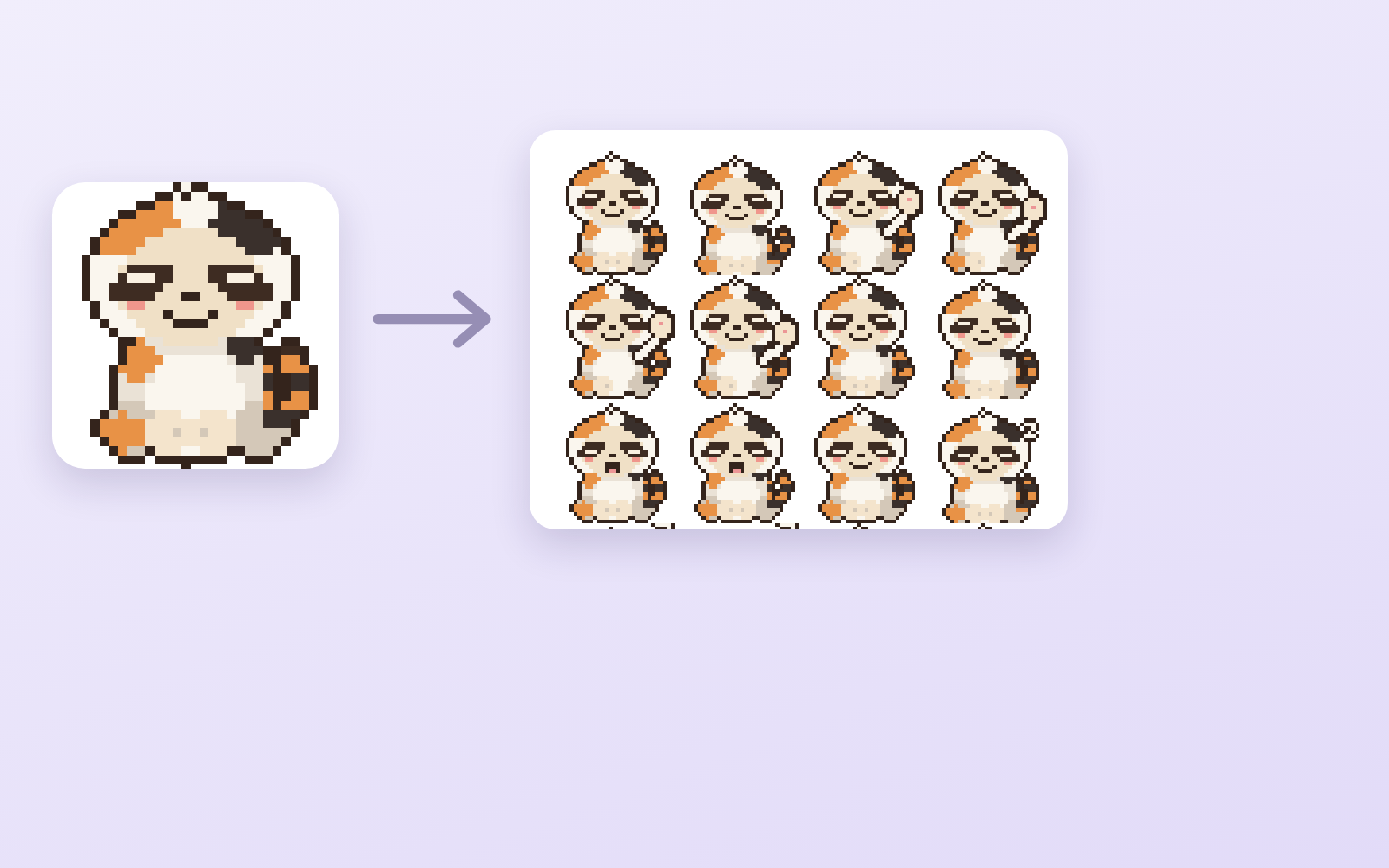
Pixel Motion Kit is a kit for Claude Code and Codex. Hand it one drawing, get 16 animated frames. Free.
When this helps
You want to animate pixel art, but AI never returns anything usable
What it does
Builds a pixel-art sprite sheet from a character drawing. What image AI actually returns is a single image on a checkerboard, with neither real transparency nor consistent sizing no matter how you ask. This makes it genuinely transparent, cuts it into 16 frames and aligns the feet. Preview the motion in a browser, choose speed and frames, then export GIF, numbered PNGs and a transparent sheet.
The fixes baked into this kit
This kit has not been used for real work yet. Once the fixes found in the field are in, they show up here.
What's inside
- The flow (art → sheet → fix → review → export)
- A tool that turns the checkerboard into real transparency
- A tool that aligns frames that drift
- A screen to watch the motion and set speed
- GIF, numbered PNG and transparent sheet export
- Where image AI ignores your instructions, and how to fix it
File list (10)
- tools/sheet.py (★the core: transparency, slicing, alignment and export in one pass)
- tools/sheet.py --apply (re-export only, with the speed and frames you chose on screen)
- tools/app.py + app.html (★the only screen: watch the motion and decide)
- tools/gensheet.mjs (generate the sheet with a key — you can proceed without it)
- tools/build-site.mjs / tools/deploy.sh (view it on a phone)
- rules/FLOW.md (the order of the 5 stages)
- rules/TONE.md (rules for pixel art and motion)
- rules/PROMPTS.md (prompts you can paste as-is)
- rules/CHECK.md (checks before you hand it over)
- middleware.js / CLAUDE.md / KIT.md
The first three decisions
- The character (existing art is fine)
- The motion (combat by default)
- Frame count (start with 4×4 = 16)
What you need
- Extra costA way to produce artworkYou need character art. Your own image AI or existing illustrations both work.
- Extra costA Gemini key (optional)Only if you want to hand over a drawing and have it run start to finish. ★Image generation needs a paid plan. You can get the same result without a key by pasting the prompts yourself.
- No extra costPython (Pillow)If you do not have it, one line installs it: pip install Pillow
How to use
Just paste this into your AI.
I want to use the nice to have kit "Pixel Motion Kit". Follow https://nicetohave.app/en/g/Y3FEQLMA-•••••••••• and set it up.
Works the same in Claude Code or Codex. If you have Safe Rail (the guard that stops dangerous operations automatically), it fetches the kit for you.
Read what this tells your AI to do, before you paste it
If you would rather take the files yourself
Paste the line above and your AI fetches it. To download it yourself, start here.
- Unpack the zip you downloaded
- Open the resulting folder in Claude Code or Codex (in VS Code, "Open Folder")
- Type "start building with this kit". The instructions are inside (Claude Code reads
CLAUDE.md, Codex readsAGENTS.md)
This route comes without Safe Rail, the guard that stops dangerous operations automatically. If you are building something that handles keys or personal data, use Claude Code with Safe Rail.
FAQ
- What does Pixel Motion Kit do?
- Builds a pixel-art sprite sheet from a character drawing. What image AI actually returns is a single image on a checkerboard, with neither real transparency nor consistent sizing no matter how you ask. This makes it genuinely transparent, cuts it into 16 frames and aligns the feet. Preview the motion in a browser, choose speed and frames, then export GIF, numbered PNGs and a transparent sheet.
- Which AI tools does it work with?
- Claude Code and Codex. Copy the one line on the kit page and paste it into your AI; it pulls in the kit and starts (copying needs a GitHub or Google sign-in).
- Does it cost anything?
- The kit is free. A way to produce artwork, A Gemini key (optional) may cost extra. The AI tool itself is billed under your own plan.
- What do I decide first?
- Three things: The character (existing art is fine); The motion (combat by default); Frame count (start with 4×4 = 16). The AI asks them one at a time.
- Does it handle personal data?
- No.
Reviews
This is your kit. You can also see its reviews on your page.
No reviews yet. Be the first to say something.
Supporters
Once support opens, the people who backed this kit will be listed here.
- Publisher
 ohirutabeyo
- Published
- 2026/09/11
- Price
- Free
- Category
- Video & stickers
- Personal data
- Not handled
- Security review
- Not needed (no personal data)
- What's inside
More kits
ohirutabeyo2026/08/30
 Pet Naming KitFree
Turn photos and info into name candidates, then decide by saying them aloud
Pet Naming KitFree
Turn photos and info into name candidates, then decide by saying them aloud
 sariqh2026/09/27
 YouTube Game KitFree
Bring your game up to YouTube's requirements, all the way to applying
ohirutabeyo2026/09/17
YouTube Game KitFree
Bring your game up to YouTube's requirements, all the way to applying
ohirutabeyo2026/09/17