Furniture-to-3D Kit is a kit for Claude Code and Codex. Spec drawings and product photos into an AR-ready 3D model. Free.
When this helps
You want to show furniture in AR, but outsourcing each model costs ¥10,000
What it does
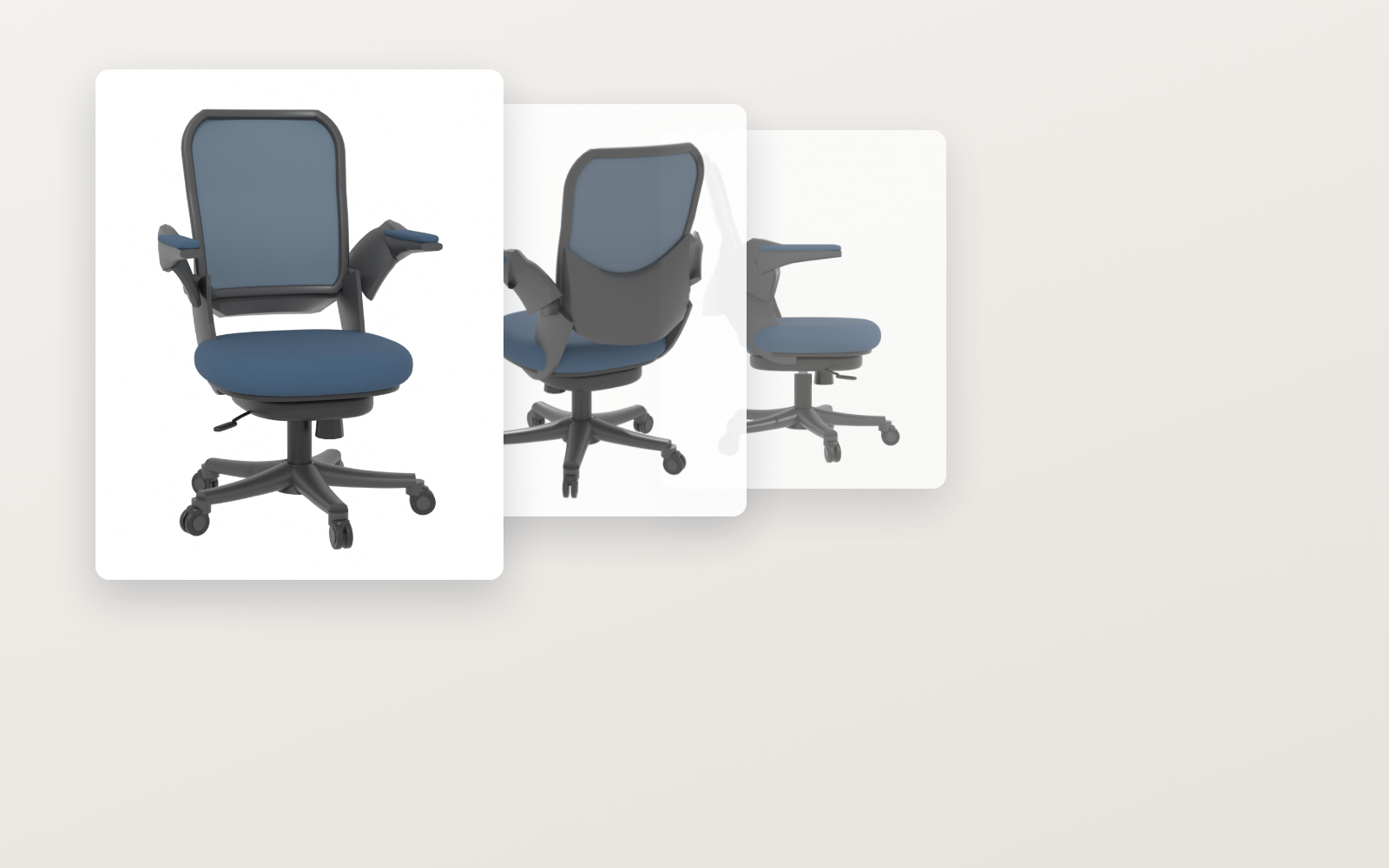
Give it a furniture product page: it builds true-to-size geometry from the spec drawing, applies colour and pattern from the product photos, and exports a .glb you can put into AR. Deviation from the target is reported in millimetres and overlap with the photo as a number, so you can judge by eye whether it is good enough to ship. How faces not visible in the photos were filled in is always shown as an image. Colour and size variants of the same shape come out by swapping numbers.
The fixes baked into this kit
This kit has not been used for real work yet. Once the fixes found in the field are in, they show up here.
What's inside
- The flow (collect → choose → build → align → texture → export)
- A tool that collects and sorts images from a product page
- A tool that builds geometry to the spec (office chairs for now)
- A tool that aligns model to photo and scores the overlap
- A tool that applies colour from photos and fills unseen faces
- What AR (USDZ) conversion silently drops, and how to avoid it
- Pre-ship checks (real size, floor, origin, glTF spec)
File list (10)
- tools/fetch_page.py (fetch the product page once, with a cap)
- tools/pick_images.py (sort into spec drawings, product photos and colour variants)
- tools/build.py + tools/kinds/office_chair.py (★the core: builds geometry from dimensions)
- tools/fit_camera.py (match the camera to the photo and score the overlap)
- tools/texture.py (apply colour and pattern from photos, fill faces not visible)
- tools/check.py (the check sheet) / tools/view_glb.py (open the .glb in a browser and capture it)
- tools/glb_mask.py (turn semi-transparency into cut-outs — for AR) / tools/validate_glb.mjs (spec check)
- tools/tune_shape.py (nudge numbers the spec drawing does not give, toward a better overlap)
- rules/FLOW.md, PICK.md, EXPORT.md, TONE.md, PROMPTS.md, CHECK.md
- CLAUDE.md / KIT.md
The first three decisions
- Which product (link to the product page)
- Colour (when there are variants)
- Height (for adjustable furniture, the lowest position)
What you need
- No extra costBlender (the 3D tool)Free. 5.2.1 LTS or newer. It runs headless, so the portable build is fine (the AI walks you through installing it).
- No extra costA spec drawing or dimension table★Without this it cannot be built. Sizes are never guessed — if it is missing, you get asked.
- No extra costProduct photos on a white backgroundOne is enough. Bigger is cleaner. Photos of the piece in a room will not work.
- Extra costAn AR viewing service (optional)What you get is a .glb. If you use a service to turn that into an AR link, that cost is separate.
How to use
Just paste this into your AI.
I want to use the nice to have kit "Furniture-to-3D Kit". Follow https://nicetohave.app/en/g/5BDRESF6-•••••••••• and set it up.
Works the same in Claude Code or Codex. If you have Safe Rail (the guard that stops dangerous operations automatically), it fetches the kit for you.
Read what this tells your AI to do, before you paste it
If you would rather take the files yourself
Paste the line above and your AI fetches it. To download it yourself, start here.
- Unpack the zip you downloaded
- Open the resulting folder in Claude Code or Codex (in VS Code, "Open Folder")
- Type "start building with this kit". The instructions are inside (Claude Code reads
CLAUDE.md, Codex readsAGENTS.md)
This route comes without Safe Rail, the guard that stops dangerous operations automatically. If you are building something that handles keys or personal data, use Claude Code with Safe Rail.
FAQ
- What does Furniture-to-3D Kit do?
- Give it a furniture product page: it builds true-to-size geometry from the spec drawing, applies colour and pattern from the product photos, and exports a .glb you can put into AR. Deviation from the target is reported in millimetres and overlap with the photo as a number, so you can judge by eye whether it is good enough to ship. How faces not visible in the photos were filled in is always shown as an image. Colour and size variants of the same shape come out by swapping numbers.
- Which AI tools does it work with?
- Claude Code and Codex. Copy the one line on the kit page and paste it into your AI; it pulls in the kit and starts (copying needs a GitHub or Google sign-in).
- Does it cost anything?
- The kit is free. An AR viewing service (optional) may cost extra. The AI tool itself is billed under your own plan.
- What do I decide first?
- Three things: Which product (link to the product page); Colour (when there are variants); Height (for adjustable furniture, the lowest position). The AI asks them one at a time.
- Does it handle personal data?
- No.
Reviews
This is your kit. You can also see its reviews on your page.
No reviews yet. Be the first to say something.
Supporters
Once support opens, the people who backed this kit will be listed here.
- Publisher
 ohirutabeyo
- Published
- 2026/09/12
- Price
- Free
- Category
- 3D & AR
- Personal data
- Not handled
- Security review
- Not needed (no personal data. ★It is built so that photos of people or rooms are never used)
- What's inside
More kits
 sariqh2026/09/27
 YouTube Game KitFree
Bring your game up to YouTube's requirements, all the way to applying
ohirutabeyo2026/09/17
YouTube Game KitFree
Bring your game up to YouTube's requirements, all the way to applying
ohirutabeyo2026/09/17
 Pixel Motion KitFree
Hand it one drawing, get 16 animated frames
ohirutabeyo2026/09/11
Pixel Motion KitFree
Hand it one drawing, get 16 animated frames
ohirutabeyo2026/09/11